
Skip to content
Money & Budgeting Collection

Sinking Funds Tracker

sinking funds tracker

Holidays, Christmas, the car, the wedding, the emergency fund โ€” a private, six-tab tracker for every "sinking fund" you're chipping away at, with a monthly-needed figure calculated for you and a reconciliation check that catches data-entry mistakes before they become real ones.

Why this exists

One spreadsheet trying to be fifteen savings goals at once, isn't.

Sinking funds work โ€” put money aside monthly for the things you know are coming, so a car repair or a Christmas or a wedding deposit never has to become a surprise.

The part that's hard is tracking more than two or three of them at once: which account is which fund actually sitting in, whether you're on pace for a target date, and whether the numbers still add up after a few months of moving money around.

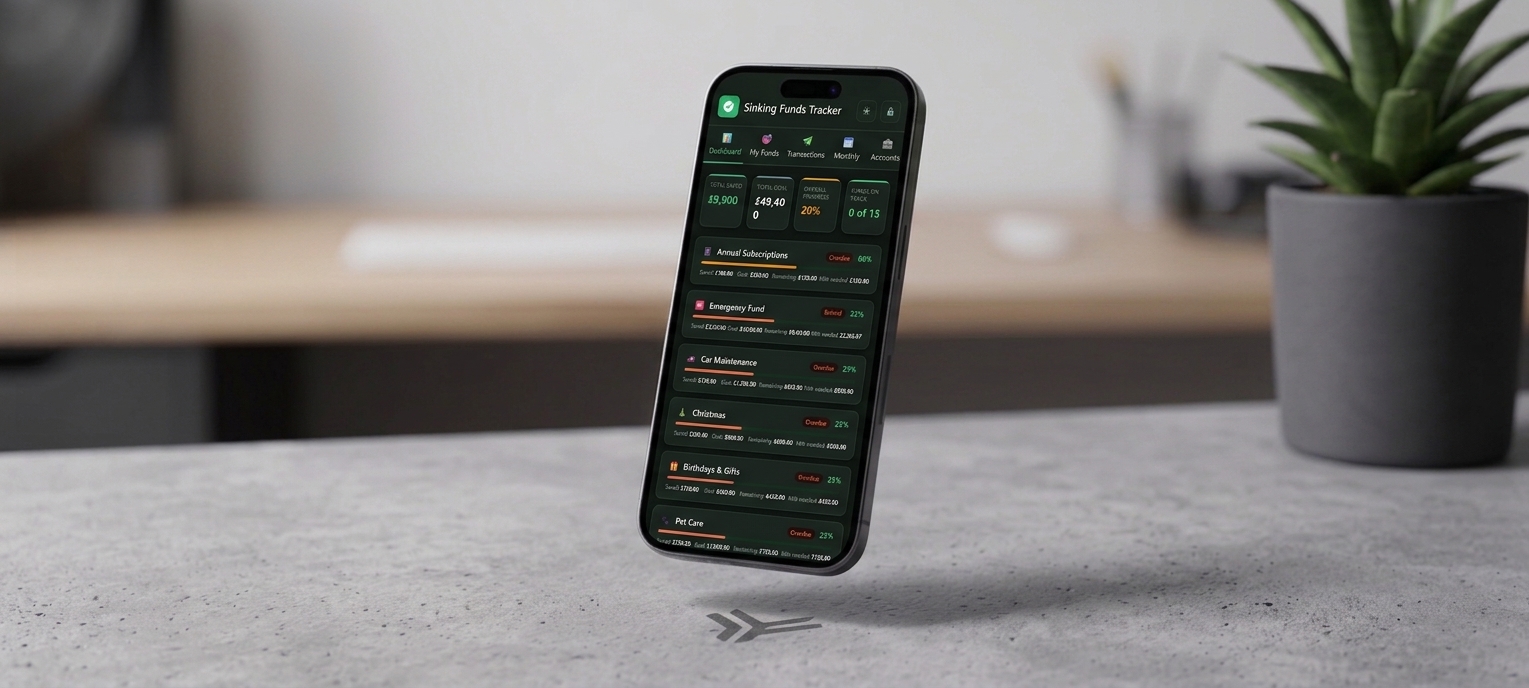
Sinking Funds Tracker is one private file with six tabs: a Dashboard for the big picture, a Funds tab that calculates what you need to save monthly for every goal automatically, a Transactions log with a running balance, Monthly and Yearly views for spotting patterns, and an Accounts tab that reconciles what's actually in your accounts against what your funds say you've saved โ€” all behind a password-protected, encrypted vault.

Saved automatically, protected by default

Everything you enter saves to this browser within about a second โ€” a small "Saved" badge confirms it โ€” and from the very first time you open the file, it's encrypted with a password you set. There's no unprotected mode to forget to turn on.

See it in motion

A video walkthrough of the whole system

Inside the download

Six tabs. Every fund you're saving for, in one encrypted file.

Everything below is what's actually in the file you download โ€” not a mockup of a future version.

๐Ÿ“Š 01 โ€” Dashboard

The big picture, at a glance

  • Total saved, total goal, and overall progress across every fund you're tracking
  • A count of how many funds are on track, plus a card per fund with its own progress bar, status, and monthly-needed figure
  • A bar chart of your top 10 funds by balance, so you can see where the bulk of your savings actually sits
๐ŸŽฏ 02 โ€” My Funds

Every goal, with the maths done for you

  • An emoji, name, goal, balance, target date, category, priority, and notes for each fund
  • Monthly Needed recalculates automatically from your goal, balance, and target date โ€” no spreadsheet formula to maintain
  • A status pill per fund โ€” On Track, Behind, Overdue, or Complete โ€” so you know where you stand without doing the maths yourself
  • Export to CSV any time for a spreadsheet copy of your fund data
๐Ÿ’ธ 03 โ€” Transactions

A running log, with a running balance

  • Every deposit and withdrawal, tied to a specific fund, with a live running balance as you add entries
  • Add a transaction in a couple of clicks โ€” the fund's balance and status update immediately
  • Export the whole log to CSV for your own records or to hand to an accountant
๐Ÿ“… 04 โ€” Monthly

Which months you actually save in

  • A fund-by-month grid showing every deposit made throughout a chosen year
  • A year-to-date total per fund, so you can see at a glance who's ahead and who's slipping
  • Useful for spotting exactly which months you tend to let a fund slide
๐Ÿ“ˆ 05 โ€” Yearly

The year, zoomed out

  • Total saved, total withdrawn, and net saved for a chosen year, across every fund
  • A month-by-month breakdown so you can see the shape of your saving over the whole year
  • A progress snapshot across all funds, without switching tabs to piece it together
๐Ÿฆ 06 โ€” Accounts

Where the money actually lives โ€” and whether it adds up

  • List the real accounts your sinking funds live in โ€” a high-yield savings account, a current account, a cash app, an ISA โ€” and assign each fund to one
  • The Reconciliation Check compares your total across accounts to your total across funds and flags any difference, so a balance updated in one place but not the other doesn't go unnoticed
  • Rename an account and every fund assigned to it follows automatically โ€” nothing gets orphaned
What actually sets it apart

A budgeting app that checks its own arithmetic, and locks itself when you walk away.

Catches mistakes you'd otherwise miss

Reconciliation, not just tracking

Most trackers will happily let your account balances and your fund balances drift apart without ever telling you. Sinking Funds Tracker's Accounts tab compares the two totals and flags a mismatch the moment they don't line up โ€” so a balance you forgot to update, or a transfer you logged twice, gets caught early instead of six months later.

Flags the difference automatically, every time you visit the tab
Built for genuinely sensitive data

Mandatory AES-256, not an afterthought

Your balances, account names, and savings goals are encrypted the moment you set a password on first use โ€” there's no unprotected mode to forget to turn on. It's the same AES-256 encryption, with 250,000 rounds of key derivation, used across the collection's most secure apps, applied here by default and auto-locking after 10 minutes idle.

Password required from the very first launch
Built for real financial data

Nothing about your accounts or balances belongs on someone else's server.

Sinking Funds Tracker is unusually private โ€” and worth understanding fully before you enter real numbers.

Local only, by design

No server, no account, no network requests. Everything autosaves to this browser and never leaves your computer unless you export it.

No password reset โ€” genuinely

Because your password is the encryption key, forgetting it means the data on that device can't be recovered. The "Forgotten your password?" link is the only way back in, and it wipes the tracker completely โ€” keep a recent Export Data (JSON) backup.

JSON backups aren't encrypted

Export Data (JSON) saves everything to a plain file โ€” readable by anyone who opens it, which is what makes it usable as a backup or for moving between computers. Store exported files as securely as you'd keep any document with financial information in it. (CSV exports are for spreadsheets only and can't be imported back in.)

What you get

One purchase, two files

No upsells, no locked tabs โ€” this is everything included the moment you download.

.html

Sinking Funds Tracker, the app

The full six-tab tracker โ€” a single file that opens straight in your browser, no install required.

.pdf

The getting-started guide

A tab-by-tab walkthrough for your first session โ€” setup, password protection, and every tab explained.

From The Lifestyle Studio

Built so your numbers always add up

"We kept losing track of which account a sinking fund actually lived in โ€” the spreadsheet said one thing, the bank app said another, and nothing ever flagged the gap. So we built a tracker that checks its own maths: every fund gets a real monthly-needed figure, and the Accounts tab tells you the moment your totals stop matching, instead of leaving you to notice six months later."
โ€” The Lifestyle Studio
4.9โ˜… average across The Lifestyle Studio ยท 1,240+ verified reviews
Before you buy

Questions people ask

Do I have to set a password?

Yes โ€” this is one of the collection's fully-encrypted apps, so password protection isn't optional. The first time you open the file, you'll be asked to set one before you can do anything else; from then on it's the key that decrypts your tracker every time you open it.

What happens if I forget my password?

There's no reset โ€” your password is the encryption key itself, so a forgotten one means the data on that device is permanently unreadable. The "Forgotten your password?" link will get you back into the app, but it wipes everything first. Export a JSON backup regularly, as a matter of course.

What's the difference between the CSV and JSON exports?

CSV exports (from the Funds and Transactions tabs) are for opening in a spreadsheet โ€” they're not designed to be loaded back into the app. Export Data (JSON), on the Accounts tab, saves everything โ€” funds, transactions, and accounts โ€” to one file that Import Data (JSON) can load straight back in. That's your real backup and the only way to restore your data or move it to another device.

Is my exported JSON backup encrypted too?

No โ€” Export Data (JSON) produces a plain, unencrypted file by design, so it's easy to read back in or open elsewhere if you ever need to. Keep exported files somewhere as secure as you'd keep any document containing financial information.

Can I use this on more than one device?

Each device keeps its own separate copy of your data. Use Export Data (JSON) and Import Data (JSON) on the Accounts tab to move your tracker between a laptop and a home computer โ€” it doesn't sync automatically.

How do I get the files after I buy?

Both files โ€” the app and the getting-started guide โ€” are delivered instantly as a digital download, the same as every product in The Lifestyle Studio collection.

Get Your Sinking Funds Tracker Today for just $22.97

One-time purchase ยท instant digital download

๐Ÿ”’Secure Checkout
โฌ‡Instant Digital Delivery
โœŽ30-Day Support