
Skip to content
Popular Events & Celebrations Collection

Ever After Wedding Planner

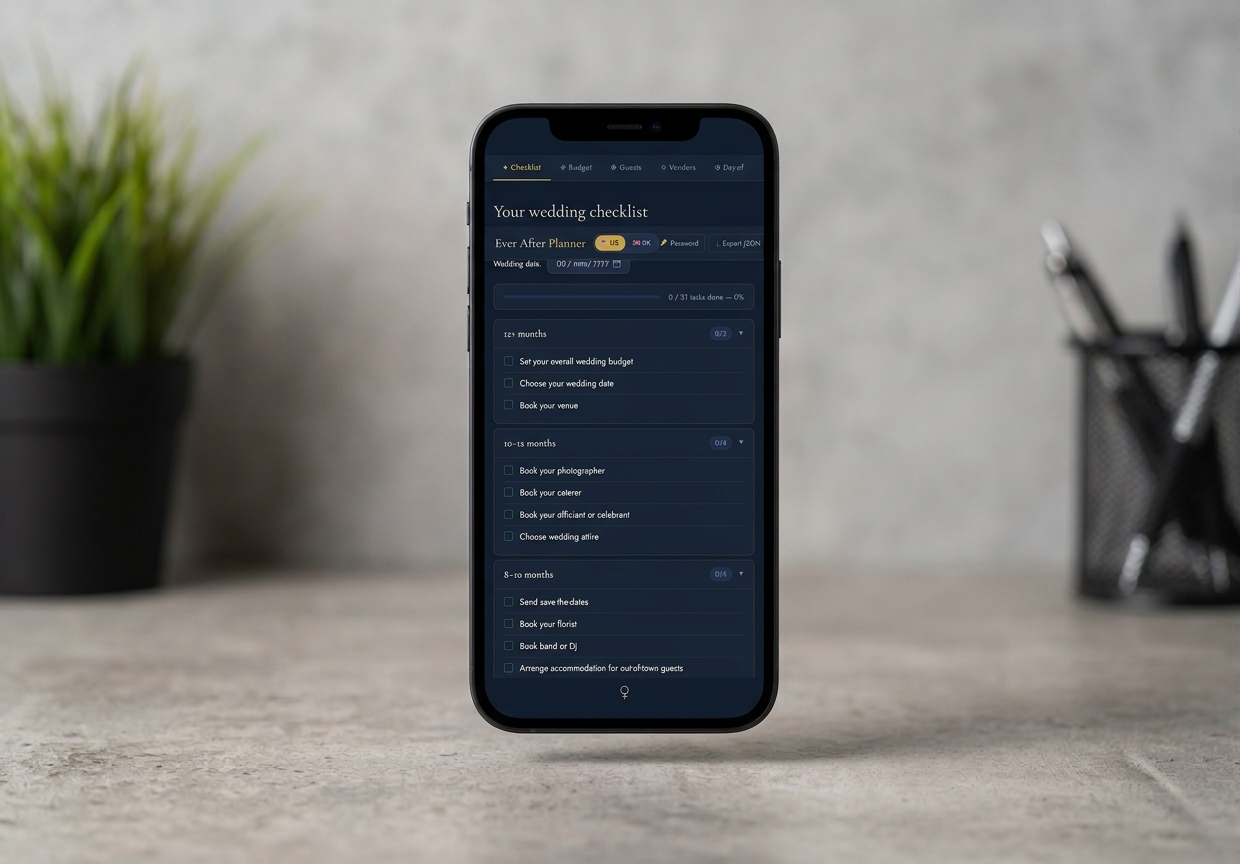
One page, five tools โ€” a checklist, a budget, a guest list, a vendor hub, and a day-of timeline โ€” built to carry the whole wedding, calmly, without a single spreadsheet.

ever after planner
Why this exists

Five tools you're already juggling, minus the juggling.

A spreadsheet for the budget. A Pinterest board for vendors. A paper guest list somewhere in a drawer. A group chat full of half-decided timings for the day itself. Wedding planning doesn't lack tools โ€” it drowns in loosely connected ones, none of which talk to each other.

Ever After Planner is one calm page: a phase-by-phase checklist, a budget that flags overspend as it happens, a guest list with a running seat count, a vendor hub with contracts and deposits, and an hour-by-hour timeline that sorts itself. Open it, and everything about the wedding is in one place.

One habit worth building

Ever After Planner keeps everything in your browser's memory, not a server โ€” genuinely private, but it also means nothing autosaves. Click Export JSON at the end of any session to save your work as a small file; closing the tab without exporting clears it. It's the one rule the whole planner runs on.

See it in motion

A video walkthrough of the whole system

Inside the download

Five tools. Every detail, in order.

Everything below is what's actually in the file you download โ€” not a mockup of a future version.

โœฆ 01 โ€” Checklist

A to-do list already broken into phases

  • Ready-made phases from 12+ months out down to wedding week, each a collapsible card with its own progress bar
  • Country-specific legal tasks โ€” a marriage licence in the US, giving notice of marriage in the UK โ€” that swap automatically with the country toggle
  • An optional AI touch: describe a concern in your own words and get a custom task added to the list
โ—ˆ 02 โ€” Budget

Eleven categories, estimated vs. actual

  • Venue, catering, photography, flowers, attire, and six more standard categories โ€” tracked side by side
  • Estimated, actual, and deposit columns, with each category's share of your total budget calculated automatically
  • A row turns red the moment actual spend passes what you estimated, so overspend is visible at a glance
โ—‰ 03 โ€” Guests

Your full list, with a running seat count

  • Add each guest with a group (Family, Friends, Work, Other), dietary needs, and RSVP status
  • A plus-one toggle and a live seat count โ€” attending guests plus their plus-ones โ€” kept current as RSVPs come in
  • Filter the list by group or RSVP status once the guest count grows past a glance
โ—‡ 04 โ€” Vendors

Every supplier, contract, and payment in one hub

  • Business name, category, contact details, cost, deposit, and deposit due date for every vendor you're working with
  • A status badge for each โ€” Enquiry, Tentative, Confirmed, or Cancelled โ€” so where things stand is obvious at a glance
  • Category filters that fill in automatically based on the vendors you've already added
โ—‘ 05 โ€” Day-of

An hour-by-hour running order that sorts itself

  • Add a time, an event name, and an expected duration โ€” it's inserted automatically in the right chronological spot
  • Your wedding date stays in sync with the Checklist tab, powering a live "days to go" countdown in both places
  • Edit any event and the whole schedule re-sorts by time automatically โ€” nothing to reorder by hand
What actually sets it apart

Most planners assume one country and one currency. This one doesn't.

Built for two countries

US or UK, without losing your progress

Switch the header toggle between US and UK and the currency symbol updates across Budget and Vendors, and the legal checklist tasks change to match โ€” a marriage licence application, or giving notice of marriage at a register office. Nothing else on your checklist, guests, or vendors is affected.

$ โ‡„ ยฃ, plus country-specific legal tasks โ€” one toggle
One date, everywhere it matters

Set it once, see it everywhere

Your wedding date lives in one place, but it powers the countdown on both the Checklist tab and the Day-of timeline โ€” set it once, on either tab, and the other updates itself.

Checklist countdown โ‡„ Day-of countdown, always in sync
Built for a private plan, honestly

Nothing about a wedding budget belongs on someone else's server.

Ever After Planner is unusually private โ€” and that comes with one habit worth understanding before you start entering real numbers.

Nothing stored, until you say so

There's no server and no account โ€” the planner doesn't even use browser storage in the background. Your data exists only in the open tab, unless you export it.

Export before you close the tab

Refreshing or closing the page clears everything that isn't exported, and a lost export file can't be recovered โ€” there's no server-side copy to restore it from. Make Export JSON a habit at the end of every session.

The lock is a soft one

Optional password protection deters a shared computer or a partner walking past โ€” it's not built to withstand a determined attacker, and the app says so plainly rather than overpromising.

What you get

One purchase, two files

No upsells, no locked tabs โ€” this is everything included the moment you download.

.html

Ever After Planner, the app

The full five-tool planner โ€” a single page that opens straight in your browser, no install required.

.pdf

The user guide

A 13-section guide to every tab, exporting, and password protection โ€” including the one rule to remember.

Customer Reviews

Loved by planners worldwide

โ˜…โ˜…โ˜…โ˜…โ˜…
"We organized our entire 180-guest wedding using the Ever After Wedding Planner. The vendor budget tool saved us thousands!"
Chloe & James โ€” Verified Buyers
4.9โ˜… average across The Lifestyle Studio ยท 1,240+ verified reviews
Before you buy

Questions people ask

Do I need to create an account?

No. There's nothing to sign up for. Open the file in your browser and you're straight into the Checklist tab.

What happens if I refresh the page by accident?

Anything you haven't exported is cleared โ€” this is by design, since nothing is stored in the background. Export JSON regularly and you'll always have a recent copy to import back in.

Do I need an internet connection?

No, other than the two optional AI touches and slightly faster font loading. The checklist, budget, guests, vendors, and timeline all work fully offline.

Will my data sync between my laptop and my partner's?

Not automatically โ€” there's no shared account or cloud sync. Export on one device and Import on the other whenever you want to share the latest version.

What if I forget my password?

There's a "Forgot password?" link on the lock screen, but since there's no server to verify your identity, using it clears the lock along with any data you hadn't exported. Set a password you'll remember, and export often regardless.

How do I get the files after I buy?

Both files โ€” the app and the user guide โ€” are delivered instantly as a digital download, the same as every product in The Lifestyle Studio collection.

Ready when you are

Get Your Ever After Wedding Planner for just $27.97

One download. Every tool described above. Nothing left to unlock later.

One-time purchase ยท instant digital download
Get Ever After Planner โ€” $27.97
๐Ÿ”’Secure Checkout
โฌ‡Instant Digital Delivery
โœŽ30-Day Support