
Skip to content
Teaching & Classroom Collection

Classroom Command

classroom command

A private, five-tab planner built for one teacher's real week: lesson planning, a properly weighted gradebook, attendance, IEP/SEND records, and a dashboard that pulls it all together โ€” encrypted with a password from the very first time you open it, in one file that never leaves your computer.

Why this exists

Five tools you're already juggling between classes, replaced by one that locks.

A spreadsheet for grades that doesn't calculate a weighted average properly. A paper attendance register. A separate, less secure file for SEND and IEP notes because it holds even more sensitive information than the rest. A lesson plan scrawled in a notebook that never makes it back to the gradebook. None of it is protected the way information about actual students should be.

Classroom Command is one private file with five tabs: a Setup tab for your school, timetable, and roster, a Weekly Plan grid for lesson-by-lesson notes, a Gradebook that calculates a properly weighted average and letter grade automatically, an IEP/SEND tab for support plans and communication logs, and a Dashboard that pulls the at-a-glance view together โ€” all behind a password-protected, encrypted vault.

Saved automatically, protected by default

Everything you type saves to this browser within a second or two โ€” a small โœ“ Saved indicator flashes to confirm it โ€” and from the very first time you open the file, it's encrypted with a password you set. There's no unprotected mode to forget to turn on.

-->
See it in motion

A video walkthrough of the whole system

Inside the download

Five tabs. Everything about your classroom, in one encrypted file.

Everything below is what's actually in the file you download โ€” not a mockup of a future version.

๐Ÿซ 01 โ€” Setup

Your school, your timetable, your roster โ€” once

  • Teacher name, school name, academic year, start date, and weeks in the year (defaults to 38, adjustable)
  • Up to 8 class periods with a subject and optional times โ€” leave any unused and they stay hidden everywhere else in the app
  • An unlimited student roster: first name, last name, and class or group, added one at a time
  • Export Data, Import Data, and Reset All Data live at the bottom, for backups and moving between computers
๐Ÿ“… 02 โ€” Weekly Plan

One grid, every period, every day

  • A row for each active period, a column for Monday through Friday โ€” click a cell and type your lesson notes
  • Saves as you type, with no button to press, and jumps forward or back a week with Prev / Next or a direct date pick
  • A status dropdown per row โ€” Not Started, In Progress, or Done โ€” so you can see where each class stands at a glance
  • A Weekly Notes box underneath for anything that doesn't belong to one specific lesson
๐Ÿ“Š 03 โ€” Gradebook

Grades and attendance, calculated properly

  • Add an assignment with a name and points value (defaults to 100, validated so it can't end up worth zero or a negative amount)
  • Score any student and their running average updates instantly โ€” weighted by points, not a naive average across assignment count, so a big test counts for more than a small quiz
  • A due date per assignment, and a confirmed delete that removes every score tied to it if you need to undo one
  • An attendance grid for the last 10 weeks โ€” click a cell to cycle Present, Absent, Late, with the Absences column turning red at 3 or more
๐Ÿ—‚๏ธ 04 โ€” IEP / SEND

Support plans kept separate, and never forgotten

  • A collapsible profile per student: plan type (IEP, EHCP, 504, or SEND Support), next review date, SENCO or case manager, and a parent or guardian contact
  • An Accommodations log for specific adjustments and which subjects they apply to
  • A Communication Log for contact with parents or staff โ€” date, method, and a short summary
  • A badge flags any review due within 14 days or overdue, right on the profile and again on the Dashboard
๐Ÿ“ˆ 05 โ€” Dashboard

Everything else, pulled into one screen

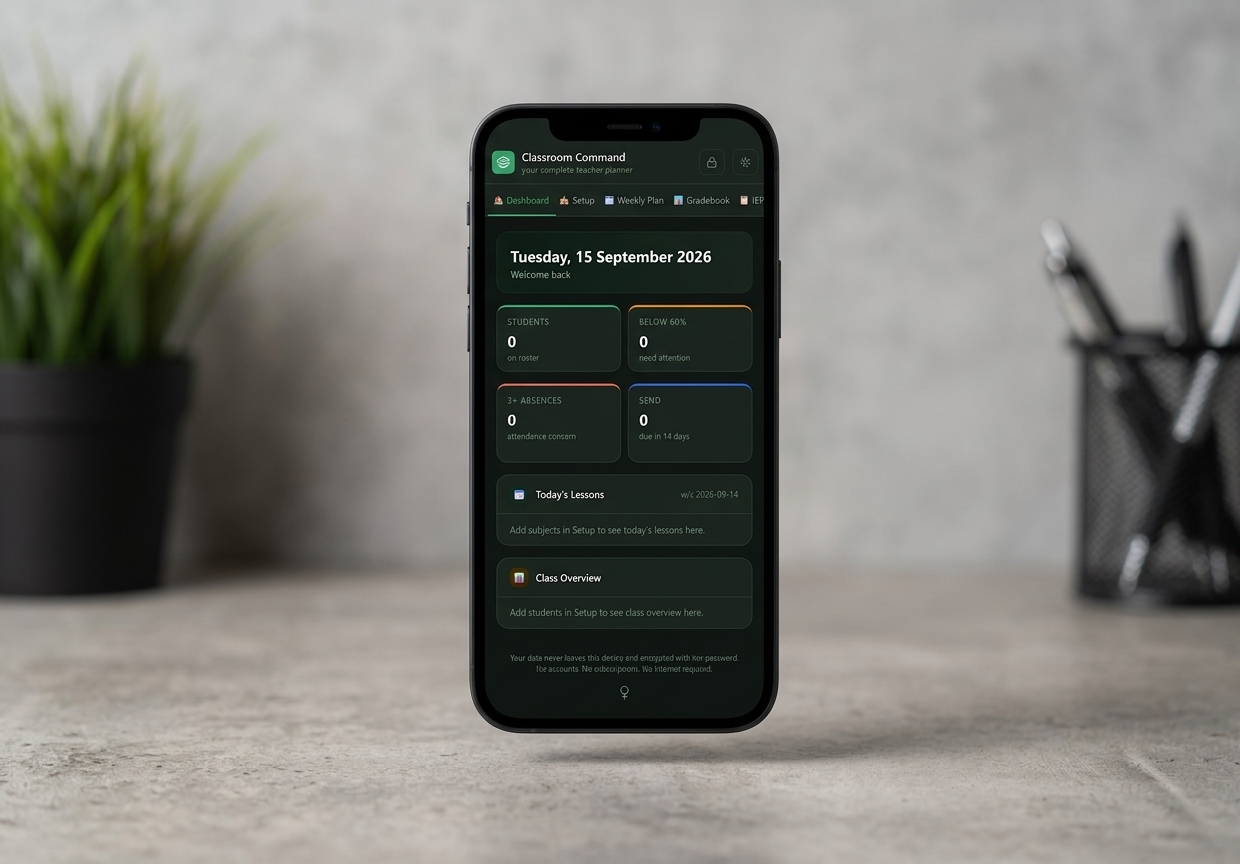
  • Four live counts: students on your roster, students below 60%, students with 3 or more absences, and SEND reviews due in the next 14 days
  • Today's Lessons, pulled straight from whatever you've written in the Weekly Plan for today
  • Class Overview โ€” a one-line summary per student: group, current grade, and absence count, all in one table
What actually sets it apart

Most class trackers ask for an account. This one asks for a password, once, and locks itself.

Built for genuinely sensitive data

Mandatory AES-256, not an afterthought

Student names, grades, attendance, and SEND/IEP records are encrypted the moment you set a password on first use โ€” there's no unprotected mode to forget to turn on. It's the same AES-256 encryption, with 250,000 rounds of key derivation, used across the collection's most secure apps, applied here by default and auto-locking after 10 minutes idle.

Password required from the very first launch
The gradebook does real maths

A properly weighted average, every time

Score an assignment worth 40 points and one worth 5, and Classroom Command weighs them accordingly when it calculates each student's running average and letter grade โ€” not a naive average across assignment count. It's the calculation a spreadsheet usually gets wrong.

Weighted by points, not by assignment count
Built for real student data

Nothing about your students belongs on someone else's server.

Classroom Command is unusually private โ€” and worth understanding fully before you enter real names and records.

Local only, by design

No server, no account, no network requests. Everything autosaves to this browser and never leaves your computer unless you export it.

No password reset โ€” genuinely

Because your password is the encryption key, forgetting it means the data on that device can't be recovered. Reset All Data is the only way back in, and it wipes the planner completely โ€” export a backup regularly.

Exported backups aren't encrypted

Export Data saves everything to a plain file โ€” readable by anyone who opens it, which is what makes it usable as a backup or for moving between computers. Store exported files as securely as you'd keep any document with student information in it.

What you get

One purchase, two files

No upsells, no locked tabs โ€” this is everything included the moment you download.

.html

Classroom Command, the app

The full five-tab planner โ€” a single file that opens straight in your browser, no install required.

.odt

The getting-started guide

A tab-by-tab walkthrough for your first session โ€” setup, password protection, and every tab explained.

From The Lifestyle Studio

Built to be trusted with real student records

"We wanted a planner a teacher could actually trust with real student names and SEND records โ€” not a spreadsheet with grades sitting in the clear, and not another account for the school to worry about securing. So we built one file, encrypted from the first time you open it, with nothing to install and nothing to sync."
โ€” The Lifestyle Studio
4.9โ˜… average across The Lifestyle Studio ยท 1,240+ verified reviews
Before you buy

Questions people ask

Do I have to set a password?

Yes โ€” this is one of the collection's fully-encrypted apps, so password protection isn't optional. The first time you open the file, you'll be asked to set one before you can do anything else; from then on it's the key that decrypts your planner every time you open it.

What happens if I forget my password?

There's no reset โ€” your password is the encryption key itself, so a forgotten one means the data on that device is permanently unreadable. Reset All Data will get you back into the app, but it wipes everything first. Export a backup regularly, as a matter of course.

Is my exported backup encrypted too?

No โ€” Export Data produces a plain, unencrypted file by design, so it's easy to read back in or open elsewhere if you ever need to. Keep exported files somewhere as secure as you'd keep any document containing student information.

Can I use this on more than one device?

Each device keeps its own separate copy of your data. Use Export Data and Import Data to move your planner between a school computer and a home one โ€” it doesn't sync automatically.

Does it work on a tablet or phone?

The layout adapts for checking things on the go, but the Weekly Plan grid and Gradebook table are both wide โ€” you'll get the most comfortable experience on a laptop or a full-size tablet rather than a phone.

How do I get the files after I buy?

Both files โ€” the app and the getting-started guide โ€” are delivered instantly as a digital download, the same as every product in The Lifestyle Studio collection.

Get Classroom Command today for just $22.97

One download. Every tab described above. Nothing left to unlock later.

One-time purchase ยท instant digital download
Get Classroom Command โ€” $22.97
๐Ÿ”’Secure Checkout
โฌ‡Instant Digital Delivery
โœŽ30-Day Support